An Apify Actor live
Google Trends scraper, and the Google Trends API you can call today
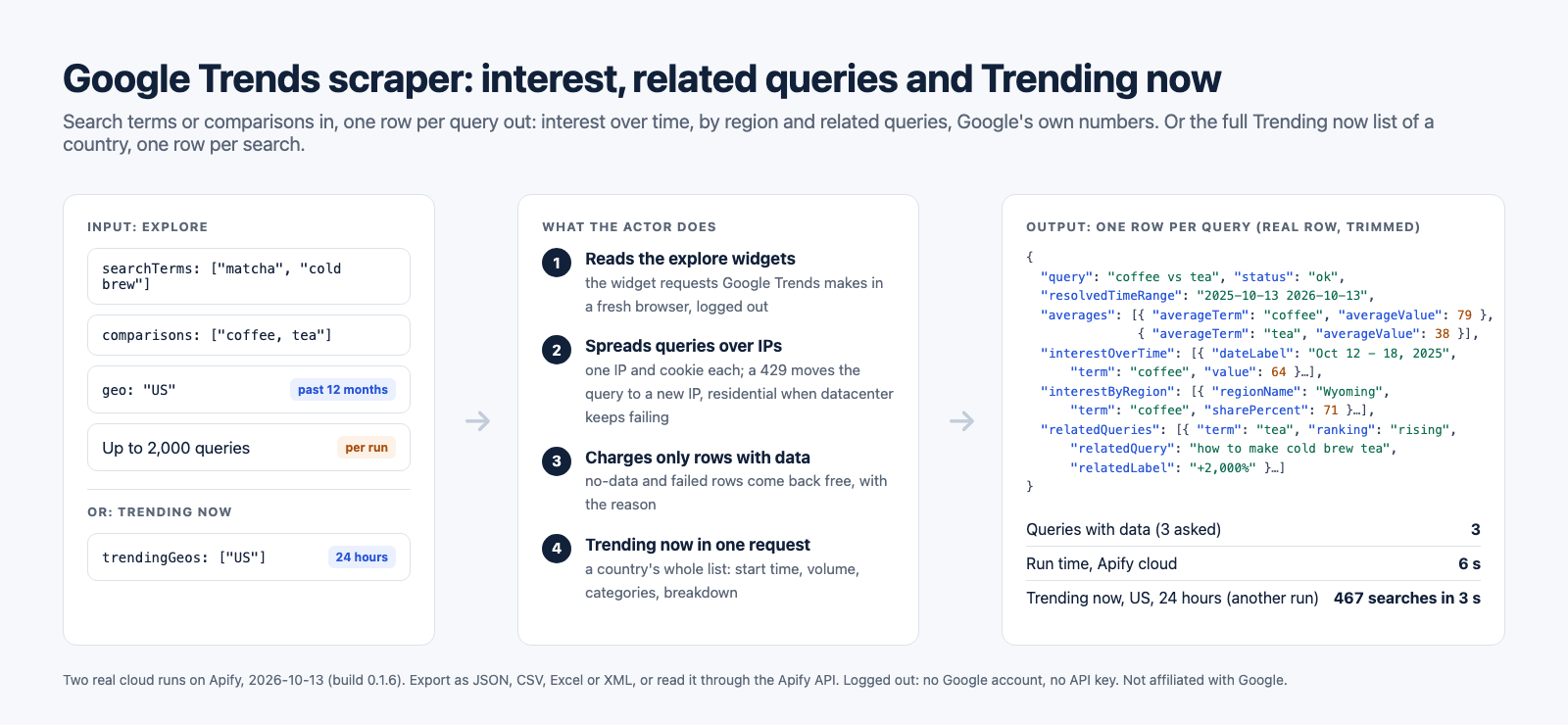
Give it search terms, comparisons of up to five terms, or Google Trends links. Get one row per query with interest over time, interest by region and related queries, the numbers the explore page shows. Or read the whole Trending now list of a country, one row per search. Up to 2,000 queries a run, logged out, and a query Google has no data for is never charged.
What you get
Everything the explore page shows, as rows.
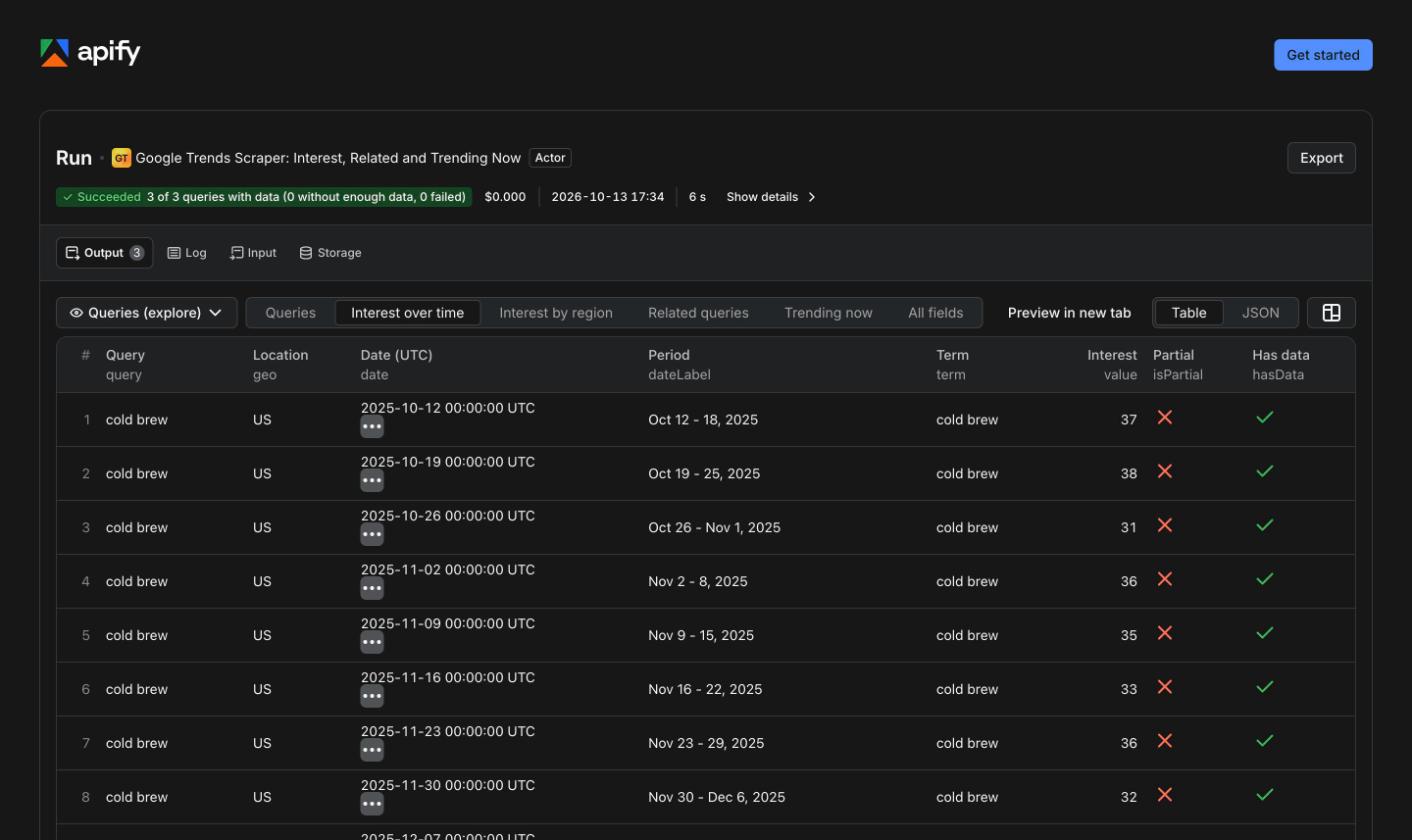
Series come in long format, one element per date and term, so one term and five terms have the same shape, and each section opens as its own flat table in Apify Console or through the API. Every key is on every row, null or empty when Google gives nothing.
| Section | What comes back |
|---|---|
| Interest over time | One point per date (or hour, or minute) and term, 0 to 100, Google's date label, and a flag on the last, still partial, point |
| Averages | Google's average per term over the period, in a comparison |
| Interest by region | Countries, regions or states, US metro areas or cities (with coordinates), per term, with each term's share in a comparison |
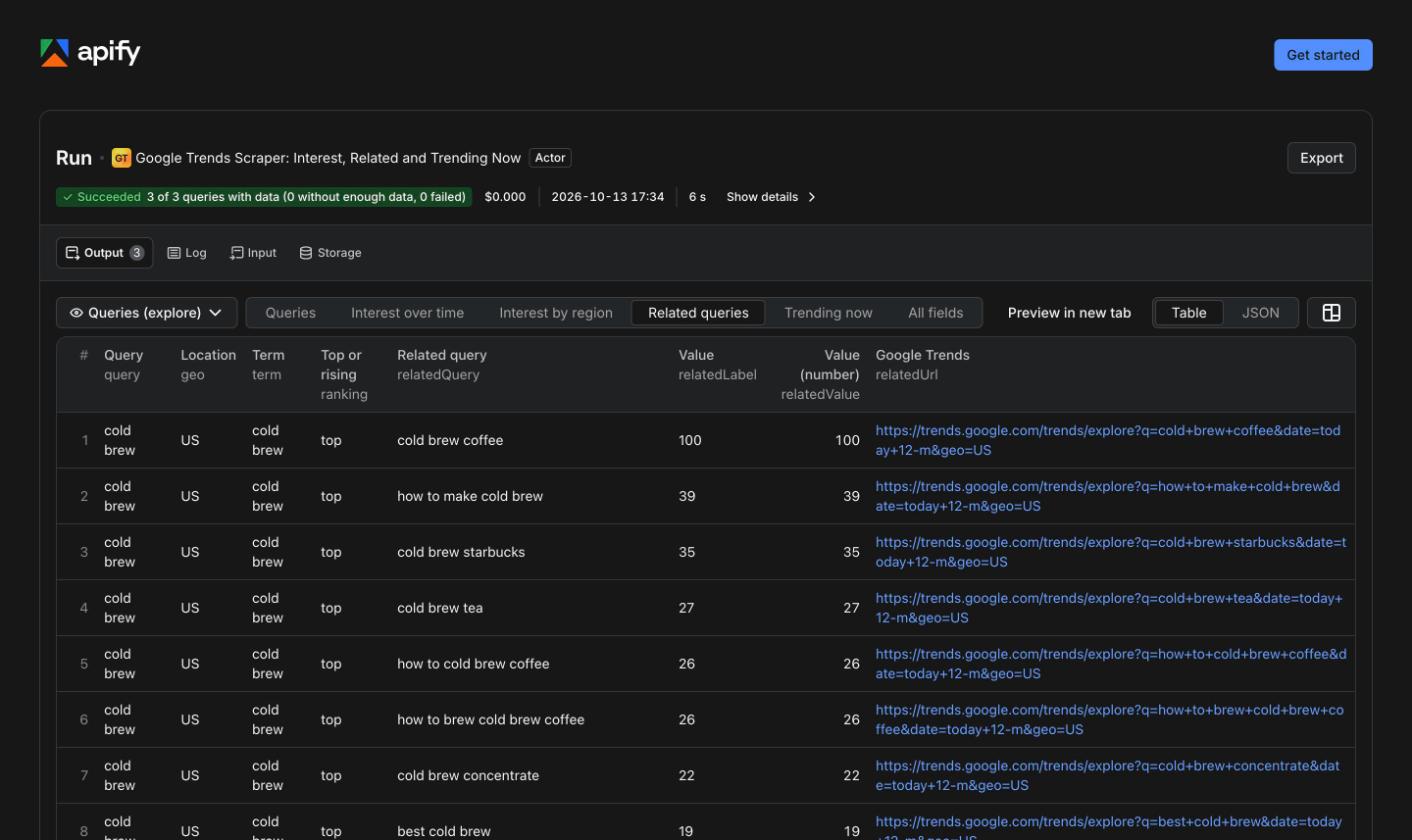
| Related queries | Top (0 to 100) and rising (+2,000% or Breakout) for each term, with a link to each on Google Trends |
| Related topics | Opt-in, returned when Google sends them (see the limits) |
| Context | The period and bucket Google resolved, category, search type (web, images, news, YouTube, Shopping), a link to the same chart, a status and notes |
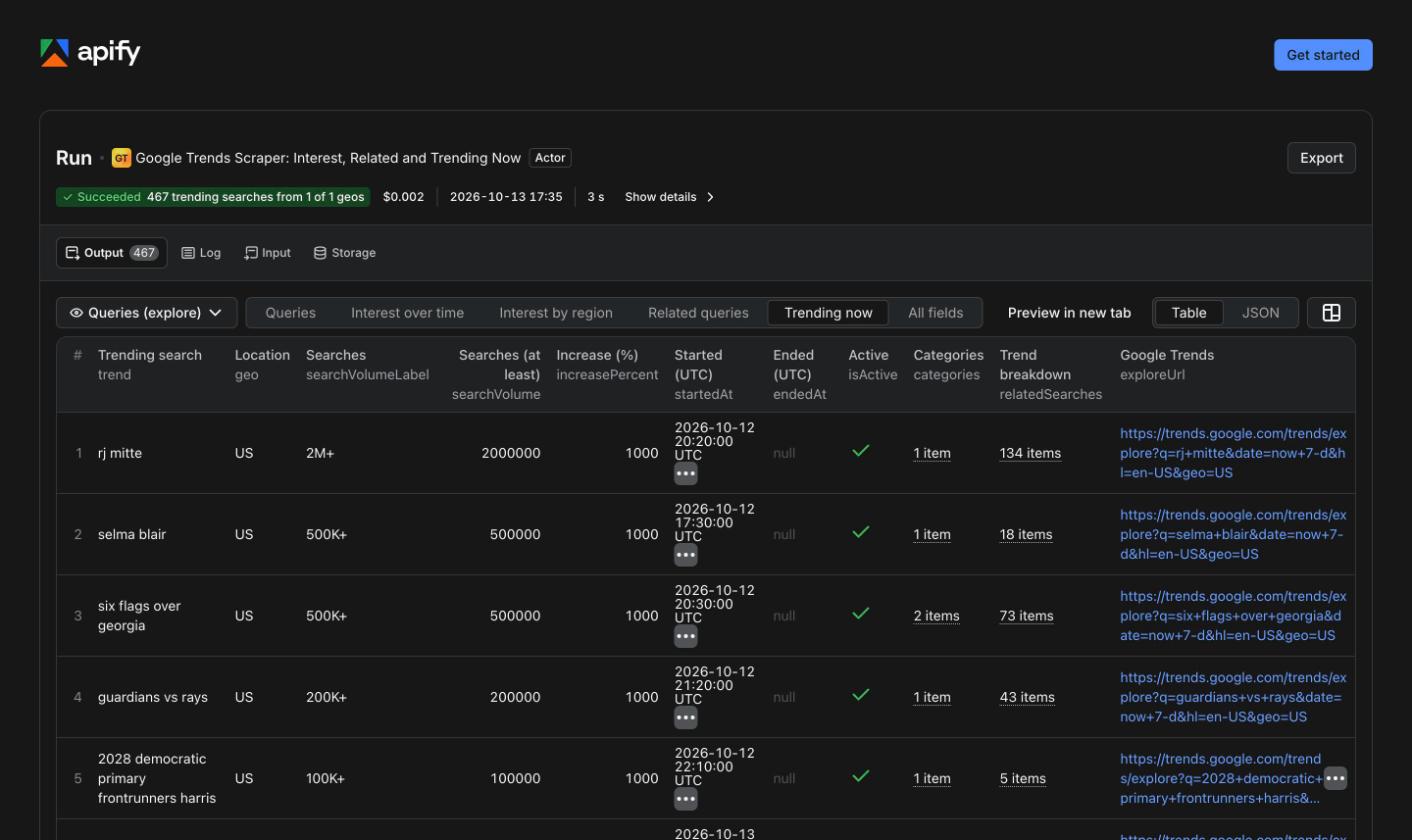
| Trending now | One row per trending search: volume bucket and lower bound, increase, start and end time, active flag, categories, the trend breakdown, a link |
How it works
The requests the page makes, spread over many IPs.
- The explore widgets. The Google Trends explore page asks one endpoint for its widgets, then the data of each: interest over time, by region, related queries (one request per term). The Actor asks the same ones, logged out, and never the explore page itself.
- Sessions past the 429 wall. Google answers HTTP 429 per IP. Each parallel worker holds its own session (one IP and its visitor cookie); a refused request is retried from a new IP, and a session that keeps failing moves to residential IPs for a while.
- Charged only for data. A term Google has not enough data for comes back as a row with status no_data, and an unreadable one as failed with the reason: both are free. A duplicate query is dropped before any request.
- Trending now in one request. The Trending now page gets its whole list from one call; so does the Actor: 467 searches for the United States over 24 hours, read in a 3.4 s run.
- An honest status. Each query in the run summary is ok, partial, no_data or failed, with its requests, its 429 answers and its time.
Measured in the cloud
Every query ends with a row and a status.
Google's rate limit decides the speed. The same three queries took 126 seconds (27 of 79 requests answered HTTP 429, the residential fallback used) and then 6 seconds (no 429), nineteen minutes apart on 2026-10-13.
Measured against the leaders
The two most used Google Trends scrapers on Apify, point by point.
apify/google-trends-scraper and data_xplorer/google-trends-fast-scraper, from their public Store data, reviews and issues, read on 2026-10-05. We ran neither. Ours from our own cloud runs.
| Point | apify/google-trends-scraper | data_xplorer | This Actor |
|---|---|---|---|
| Price per 1,000 results | $3.00 on the free tier (down to $0.10 on Diamond), plus platform usage, 4 GB default memory | $2.00 (down to $0.50), plus $0.02 per run start, announced to rise to $0.025 on 2026-10-10 | $1.50 per 1,000 queries with data, plus $0.003 per run, usage included |
| Query with no data | Charged (reviews: a costly test run with no result) | Not published | Never charged, returned with the reason |
| Runs that succeeded | 59.3% of 21,396 runs in 30 days (4,809 timed out, 3,220 aborted) | 99.5% of 46,009 runs in 30 days | 109 of 110 runs on 2026-10-05 (the failure: an empty input, refused by design); 0 failed queries in 1,297 |
| Comparison of terms | Yes | No | 2 to 5 terms on one scale |
| Related queries | Yes | No | Top and rising, per term |
| Interest by region | Subregion, city, metro through a URL | Inside one country | Country, region, US metro, city, with shares |
| Search type (images, news, YouTube, Shopping) | Not an input | No | Yes |
| Batch | List, Google Sheet, URLs | One keyword per run | Up to 2,000 queries, URLs, duplicates dropped |
| Trending now | No | Up to 1,000 items in one row per run | The whole list, one row per search |
Where we lose: the leader has years of runs and Google Sheet input, and lists related topics, which Google does not give a logged-out visitor; data_xplorer's success rate is measured over 46,009 runs, ours over 110 of our own. At volume, the leader's top tier ($0.10 per 1,000 plus usage) is cheaper than our flat price.
A real run
Two terms and a comparison in the United States, 6 seconds.
This input returned three rows on Apify on 2026-10-13 (run jXvebT4vxVZRx5pT1, $0.0002 of platform usage). The comparison row, trimmed:
{
  "searchTerms": ["matcha", "cold brew"],
  "comparisons": ["coffee, tea"],
  "geo": "US",
  "timeRange": "today 12-m"
}{
"query": "coffee vs tea",
"geo": "US",
"resolvedTimeRange": "2025-10-13 2026-10-13",
"timeResolution": "WEEK",
"status": "ok",
"averages": [
{ "averageTerm": "coffee", "averageValue": 79 },
{ "averageTerm": "tea", "averageValue": 38 }
],
"interestOverTime": [
{ "dateLabel": "Oct 12 - 18, 2025", "term": "coffee", "value": 64, "isPartial": false },
{ "dateLabel": "Oct 12 - 18, 2025", "term": "tea", "value": 34, "isPartial": false },
"...",
{ "dateLabel": "Oct 11 - 17, 2026", "term": "coffee", "value": 74, "isPartial": true }
],
"interestByRegion": [
{ "regionName": "Wyoming", "term": "coffee", "value": 100, "sharePercent": 71 },
{ "regionName": "Wyoming", "term": "tea", "value": 100, "sharePercent": 29 },
"..."
],
"relatedQueries": [
{ "term": "coffee", "ranking": "top", "relatedQuery": "coffee near me", "relatedLabel": "100" },
{ "term": "tea", "ranking": "rising", "relatedQuery": "how to make cold brew tea", "relatedLabel": "+2,000%" },
"..."
],
"notes": [],
"trendsUrl": "https://trends.google.com/trends/explore?date=today+12-m&geo=US&q=coffee%2Ctea&hl=en-US"
}
Limits
What it does not do, said up front.
- No related topics, in practice. Google sent an empty list to every logged-out client we tried; a signed-in browser saw topics. We never sign in.
- Cities can be thinner than a signed-in browser sees; the row says when Google had not enough data.
- Google's numbers are samples. The same comparison read twice gave averages of 78 and 37, then 79 and 38; rising lists changed order between two loads in a signed-in browser too. Values are relative, 0 to 100, not search volumes.
- Rising queries include Google's noise. For coffee, Google listed "home workout routines" among the rising queries, logged out and signed in alike. The Actor returns what Google lists.
- No worldwide Trending now: Google publishes the list per country or region.
Ready-to-run examples
Open one, change the input, run it.
- Coffee vs tea in Google Trends, US, last 12 months
- Today's trending searches in the US (Google Trends)
- Nike vs Adidas vs Puma in Google Trends, worldwide, 5 years
- Pickleball interest by US state in Google Trends
- Rising and top related queries for ChatGPT in Google Trends
Each example opens the Actor on Apify with its input filled in. All examples on the Apify Store.
Pricing
Pay per query with data.
$1.50 per 1,000 queries with data ($0.0015 each), every section included; $0.02 per 1,000 Trending now rows; $0.003 per run start. Billed by Apify, platform usage and proxies included. One keyword costs $0.0045; the whole US Trending now list about $0.012. A query without data, a failed query or a duplicate is never charged. Apify's free plan covers about 3,300 queries a month in batches.
For developers
A Google Trends API in one HTTP call.
Run it and get the rows back in the same request through the Apify API. Snippets for Node.js and Python are in the Actor's README.
curl -X POST "https://api.apify.com/v2/acts/agenttoolworks~google-trends-scraper/run-sync-get-dataset-items?token=YOUR_APIFY_TOKEN" \
  -H "Content-Type: application/json" \
  -d '{"comparisons": ["coffee, tea"], "geo": "US", "timeRange": "today 5-y"}'
Questions
Is there a Google Trends API?
Google announced its own Trends API as an alpha with access by application. This Actor needs no application: it makes the same requests the public Google Trends page makes, logged out, and returns interest over time, interest by region, related queries and the Trending now list as JSON rows, through the Apify API or any Apify integration.
Do I need a Google account or an API key?
No. No account, no API key, no cookie from a signed-in browser. The only cookie is the one Google gives any visitor on a first page view.
Why do Google Trends scrapers get HTTP 429?
Google rate-limits Trends per IP address. From one laptop, about 140 quick requests got the address refused for more than 75 minutes, and a new cookie did not help. The Actor spreads queries over parallel sessions with their own IPs, moves a refused request to a new IP, and hands a session that keeps failing to residential IPs. The same three queries took 126 s under that pressure and 6 s without it, nineteen minutes apart.
What does it cost?
$1.50 per 1,000 queries with data ($0.0015 each), $0.02 per 1,000 Trending now rows, and $0.003 per run start, billed by Apify with platform usage included. A query without data, a failed query and a duplicate are never charged. One keyword costs $0.0045; Apify's free plan covers about 3,300 queries a month in batches.
Does it return related topics?
Only when Google sends them, which it did not for logged-out visitors in any of our tests, from a laptop or from Apify's datacenter and residential IPs, while a signed-in browser showed them. The Actor never signs in, so related topics are opt-in and the row says when they are empty. Related queries, interest over time and by region are returned in full.
How many queries can one run read?
Up to 2,000 search terms, comparisons or Google Trends URLs. In our cloud runs, 100 queries took 74 to 159 seconds and 200 queries 329 to 516 seconds, depending on Google's rate limit.
Aggregated, anonymized search interest only: no personal data, no login, no account. Not affiliated with Google or Apify.